GearUP: Lower Lag Game Booster
- 4.2
- Rating
- 50.00M
- Installs
- Free
- Price

 Analysis by App-foxy
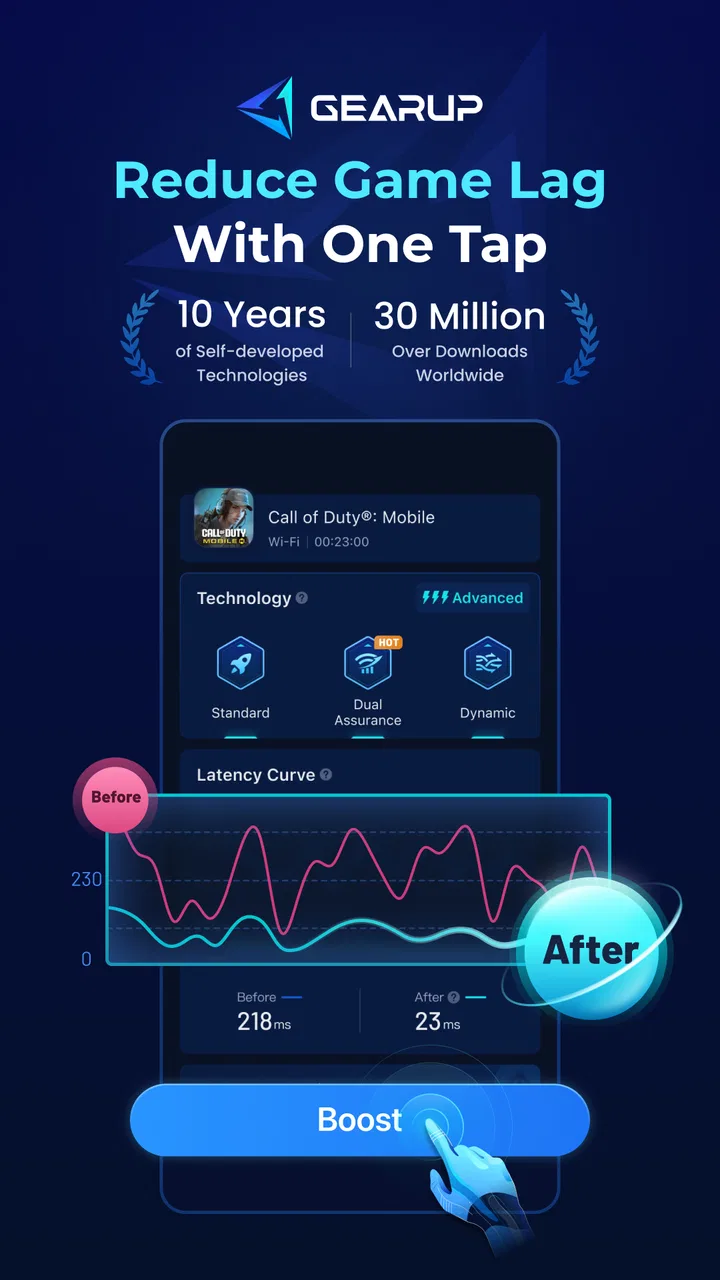
When several people in a home share the same internet connection, gaming problems can become surprisingly personal. One person starts a match, another begins a video call, and someone else downloads a large file. Suddenly a game that normally feels responsive begins to stutter. I tried GearUP: Lower Lag Game Booster in that kind of everyday situation, and I found its purpose easy to understand: it is a network-focused tool from GearUP Global that attempts to make online gaming feel steadier by working on the connection path rather than changing the game itself.
That distinction matters. This is not a general phone cleaner, a frame-rate optimizer, or a magic repair button for every gaming problem. It is a free Android app in the Tools category, aimed at reducing ping and latency. The store presents it as suitable for Everyone, and it runs on Android 6.0 or later. In practical terms, I would look at it as a connection assistant for a player who already has a game installed and wants to test whether a different network route produces a smoother session.
My main conclusion is simple: GearUP is most useful when lag comes from the route between your device and a game server, but it cannot compensate for weak hardware, overloaded home internet, or a game server that is struggling. That makes it worth trying, especially because the base app is free, but it also means expectations should stay realistic.
You May Also Like

 AccuWeather: Weather Radar
AccuWeather Review: A Quick, Clear Forecast for Everyday Decisions
For everyday plans, the best forecast is the one you can understand quickly. AccuWeather makes rain timing, radar, and local conditions easy to act on, with a few trade-offs.

 Hill Climb Racing
Why Hill Climb Racing Still Turns Crashes Into One More Run
A tiny car, a bumpy hill and one more upgrade: Hill Climb Racing keeps resurfacing because its simple chaos makes every near-miss feel personal.

 AliExpress - Shopping App
AliExpress Makes Global Shopping Feel Personal, but Shoppers Bear the Risk
AliExpress turns a global marketplace into a pocket-sized discovery engine. Its reach is useful, its shopping loop compelling, and its trade-offs easy to miss.

 Lords Mobile: Kingdom Wars
Lords Mobile Is a Kingdom-Building Routine, Not a Quick Match
A case-by-case verdict on the building, battles, device demands, and social commitments that make Lords Mobile rewarding for some players and exhausting for others.

 PDF Scanner app - TapScanner
TapScanner Makes Paperwork Easier to Capture, Check, and Share
TapScanner makes scanning with a phone feel less like a rescue operation and more like a dependable step in getting work done. Its capture tools are useful, though not flawless.

 Block Blast!
 Shows How Much a Puzzle Game Can Leave Out
A quiet grid game shows why puzzle players increasingly value instant clarity, repeatable skill and low-pressure play—and where the genre still needs to catch up.
More From Our News Desk
View All News


How it fits into a shared household
When several people share a device, I find it helps to agree on who will use GearUP and when, rather than treating it as a setting that belongs to everyone’s games. That makes it easier to compare sessions fairly and keep any purchase decisions with the device owner. It also raises a broader question: how should a household decide whether the app’s free starting point offers enough value to keep using it?
A realistic evening with one connection
Imagine a household where one person is playing a competitive online game on a phone while another is watching high-resolution video and a third is using the same Wi-Fi for a work meeting. The player may notice delayed actions, sudden rubber-banding, or an unstable connection even though the game ran well earlier in the day. GearUP can be useful in this situation as a focused experiment: start it before the game, select the title if it is available in the app, and compare the experience with the normal connection.
I would not describe this as a replacement for a good router or a sensible household schedule. If the connection is saturated, an accelerator cannot create extra bandwidth. Still, a routing tool may help when the problem is not the total amount of internet traffic but the path taken to reach the game’s servers. That is why the app can feel valuable for one game and less useful for another on the same phone.
The shared-device angle also changes how I would use it. If several people play on the same Android device, I would avoid leaving the booster active without checking who is about to use the phone. The person who needs a stable online match may benefit, while someone browsing or using another app may see no reason to keep a network-accelerating session running. A quick check before launching the game keeps the arrangement clear and prevents one user from assuming the tool improves every connection automatically.
What the app can and cannot improve
Latency is the delay between an action and the server responding. It is different from graphics performance. If a phone is overheating, dropping frames, or struggling to render a game, GearUP is not the right solution. The same is true if the device has very little free storage, the battery is nearly empty, or the game itself is poorly optimized. The app’s focus is the network side of online play.
This is also why speed-test results alone do not tell the whole story. A connection can look fast while still taking an inefficient route to a particular game server. Conversely, a routing change may not help if the local Wi-Fi signal is weak or the home connection is busy. I judge the app by the actual feel of a match: whether movement becomes more consistent, whether actions register more reliably, and whether interruptions happen less often.
For a household, that suggests a useful rule: test GearUP during the exact conditions in which lag normally appears. Testing at a quiet time may give a misleading impression. If the problem happens every evening when everyone is online, that is when the comparison matters.
Why it is different from the usual alternatives
The usual alternatives are restarting the router, switching between Wi-Fi and mobile data, moving closer to the access point, or changing settings inside the game. Those steps are still worthwhile. They address local signal quality and basic connection problems, while GearUP addresses the route used for game traffic. I see it as complementary rather than a replacement.
A virtual private network can also change routing, but a general-purpose VPN is normally designed around privacy or access to services, not specifically around game latency. A gaming booster such as this one has a narrower purpose, which can make the experience simpler for someone who does not want to configure servers manually. The trade-off is that any routing service adds another layer between the device and the game, so it is not guaranteed to improve every title or region.
Compared with phone-cleaning apps, the difference is even clearer. Removing temporary files or closing background processes may help a slow device, but it will not necessarily reduce network delay. GearUP is a better match for a player whose phone runs the game smoothly but whose online actions arrive late.
Setting boundaries before anyone starts playing
Because the app is used around games, I would establish a simple household boundary: the person launching a match should check that the booster is configured for that game, while other users should know that it is a gaming tool rather than a universal internet enhancer. This avoids arguments when someone expects faster browsing or better video playback and sees no difference.
The app is free to install, but it includes in-app purchases ranging from $0.99 to $58.99 per item. That is the point where shared-device use needs a little care. I would not let a child or casual user make purchase decisions simply because a connection still feels imperfect. First compare the normal route and the accelerated route under similar conditions. Only then can you decide whether paying for anything is justified.
For a family phone, I would also keep the store account and payment settings under the owner’s control. The app’s Everyone content rating makes it broadly appropriate from an age-label perspective, but an age rating does not replace an adult conversation about purchases, network use, or when online gaming is appropriate. The most useful boundary is not complicated: install it once, explain what it does, and make sure any paid choice is deliberate.
Setup that keeps the comparison fair
My preferred setup process is deliberately boring. I begin by closing the game completely, open GearUP, choose the relevant game if it is listed, and start the acceleration session before launching the game again. I then play long enough to encounter the type of match or online activity that normally exposes the problem. Afterward, I repeat the same test without the booster when possible.
This side-by-side approach is more reliable than deciding after one lucky match. Online games naturally vary, and a quiet server can make any setup feel excellent. I also avoid changing several things at once. If I switch from Wi-Fi to mobile data, move rooms, restart the router, and activate the booster together, I cannot tell which change mattered.
On a shared phone, I would record the practical result in plain language rather than focusing only on a displayed number: “fewer pauses during matches” is more useful to the next user than a single momentary reading. If the experience is unchanged, I would stop the session and return to checking the router, Wi-Fi placement, or the game’s own server status.
Account boundaries and everyday coordination
GearUP is easier to manage when each person understands that the app does not replace the game account. The game’s login, progress, purchases, and player identity remain separate concerns. On a shared device, I would make sure the correct player has opened the correct game account before starting a session. A network tool cannot fix confusion caused by switching profiles or launching the wrong saved account.
Coordination is especially important when two people want to play at once. If both devices use the same busy connection, accelerating one device may not solve the wider congestion. I would decide which session matters most, reduce unnecessary downloads or streaming where possible, and then test the booster on that device. This is a practical trade-off: better routing for one player does not automatically create a better connection for everyone in the home.
Another useful habit is to stop treating the booster as a permanent background requirement. If a game is already stable, there is no strong reason to assume acceleration must remain active for every session. I prefer activating it when a particular game or time of day causes trouble, then turning the experiment into a normal part of troubleshooting rather than a ritual.
Age, trust, and sensible supervision
The Everyone rating makes GearUP approachable for a broad audience, including households where younger players use the device. Even so, younger users may not understand the difference between a connection problem and a phone problem. I would explain that the app can influence the route to a game, but it cannot guarantee a win, remove all lag, or make an old device perform like a new one.
Trust also includes being clear about paid options. Since purchases are available inside the app, an adult should decide whether they are appropriate. I would treat any upgrade as a household technology purchase, not as part of the game itself. That distinction helps prevent a child from believing that better performance requires spending money after every bad match.
For older children and teenagers, the app can be a useful lesson in troubleshooting. Ask them to identify whether the problem is delayed input, frozen graphics, weak Wi-Fi, or a game-server issue. Then test one change at a time. GearUP becomes more valuable in that context because it encourages a specific diagnosis instead of random tapping through performance settings.
Version, reach, and practical expectations
The current Android version is 4.0.3, and the app has passed the point where it feels like a niche experiment: it has more than fifty million installs, with an average rating of 4.2 from roughly two hundred eighty-eight thousand ratings. Those figures suggest that many players find the concept useful, but they should not be read as a promise that every household will see the same result. Network paths, games, devices, and internet providers differ too much for that.
I also appreciate that the app’s basic price is free, because it lowers the barrier to testing. At the same time, the in-app purchase range makes it important to evaluate the free experience first. For a casual player who only encounters occasional lag, paying may be difficult to justify. For someone who repeatedly plays a latency-sensitive game and can clearly identify an improvement, the decision becomes more personal.
Android 6.0 support is helpful for households with older phones, although compatibility alone does not guarantee good gaming performance. An older device may install the app successfully while still having limitations caused by its processor, memory, battery condition, or Wi-Fi hardware. I would judge the complete setup, not just whether the app opens.
Where the experience can be frustrating
The biggest limitation is uncertainty. A routing accelerator can help, do nothing, or occasionally make a connection feel worse depending on the game and the route available at that moment. That variability means GearUP is not the kind of tool I would recommend activating blindly and forgetting about. It deserves a short before-and-after test.
There is also a small layer of friction in managing another step before gaming. Shared-device users may forget to open the booster, choose the right game, or stop expecting it to work after switching to a different title. If a household wants a completely automatic experience, a better router setup or a more stable internet plan may be a more appropriate investment.
Players should also skip it as a first choice when their main complaint is visual stutter rather than delayed online response. Lowering graphics settings, improving cooling, freeing storage, or replacing an aging phone would address that problem more directly. GearUP is not a substitute for hardware maintenance.
Who should try it, and who should look elsewhere
I would recommend trying GearUP to an Android player who has a capable phone, a game that normally runs well, and a recurring problem with ping or unstable online play. It is particularly reasonable for someone who shares Wi-Fi with several people and wants to test whether routing is part of the issue. The free entry point makes that test relatively easy, provided purchase choices are handled carefully.
I would be less enthusiastic for a player whose difficulty appears across every internet activity, including ordinary browsing and video calls. That points more strongly toward the router, internet service, or local signal. I would also steer away from it for someone who mainly plays offline games, because the app’s central benefit concerns online communication with game servers.
For competitive players who need predictable performance every day, I would combine the app with better fundamentals: wired or strong nearby Wi-Fi where possible, fewer simultaneous downloads, updated game software, and a stable home network. If those basics are already excellent and GearUP still produces no noticeable improvement, there is little reason to keep using it.
My household verdict
After looking at GearUP through the lens of shared devices and shared internet, I see it as a practical troubleshooting tool rather than a permanent household necessity. Its strongest quality is focus: it gives an online player one specific way to test whether network routing is contributing to lag. That is more useful than vague promises about making a phone “faster.”
The best workflow is to use it with clear boundaries. The device owner controls purchases, the player selects the correct game, the household reduces avoidable congestion, and everyone judges the result through real gameplay rather than assumptions. If the connection improves in the situations that matter, keep it in the toolkit. If nothing changes, move on to the router, Wi-Fi placement, device performance, or the game itself.
GearUP: Lower Lag Game Booster is therefore worth a careful trial for Android gamers dealing with inconsistent online sessions. I like that it is free to start and specific about the problem it aims to address. I would not promise it to every player, and I would not use it to excuse a weak home network. But for the right shared-device scenario, it can turn a vague complaint about “lag” into a focused, measurable experiment—and that is a genuinely useful role for a Tools app.
FAQs for GearUP: Lower Lag Game Booster
01What is GearUP: Lower Lag Game Booster, and how does it work?
GearUP: Lower Lag Game Booster is designed to improve the online gaming experience on mobile devices by optimizing the connection between your phone and game servers. It may route traffic through game-focused network paths, reduce connection instability, and help lower ping in supported titles. Its actual results depend on your internet provider, location, Wi-Fi or mobile signal, server distance, and the game being played.
02Can GearUP: Lower Lag Game Booster really reduce ping and lag in every game?
The app can help with lag caused by unstable routing, packet loss, or high network latency, but it cannot guarantee improvement in every situation. It is most useful when the problem comes from the connection rather than your device’s hardware or the game server itself. Performance may vary considerably between games, regions, networks, and times of day, so users should test it before committing to a subscription.
03Which games are supported by GearUP: Lower Lag Game Booster?
GearUP generally provides a catalog of popular online games, but the available titles can change according to the Android or iOS version, country, and current app updates. Before downloading, check the in-app game list or the official store description to confirm compatibility with your preferred title. If a game is not supported, the booster may not provide the same optimization features or measurable benefits.
04Is GearUP: Lower Lag Game Booster free to use?
GearUP may offer free access to some features, trials, or limited optimization sessions, while advanced tools and longer usage can require a paid plan. Pricing, trial availability, and subscription options may differ between Android and iOS and can change over time. Carefully review the purchase screen, renewal terms, and cancellation instructions before starting a trial, especially if payment details are already linked to your app store account.
05Does GearUP: Lower Lag Game Booster require special permissions or affect battery life?
To optimize game traffic, GearUP may request permission to create a local VPN connection or run a network-related service on your device. This does not necessarily mean it is a traditional privacy VPN, so review its privacy policy and understand how connection data is handled. Running the booster in the background can also use additional battery, mobile data, and system resources, particularly during long gaming sessions.
Pros
- One-tap boosting makes setup quick for less technical users.
- Supports many popular online games across Android devices.
- Can improve connection stability on some Wi-Fi or mobile networks.
- Offers server and route options for selected games.
- The interface is clean and easy to navigate.
Cons
- Performance gains vary widely by location
- network
- and game server.
- Some useful features require a paid subscription.
- It may increase battery consumption during extended gaming sessions.
- Background VPN-style routing can raise privacy concerns for some users.
- A booster cannot fix weak Wi-Fi
- overloaded servers
- or device limitations.

GearUP: Lower Lag Game Booster
Gallery